Remote monitor & control for Creality K2. No Cloud account, no sign in needed.
K2 Companion is the independent remote monitoring and control app for the
Creality K2, K2 Plus and K2 Pro 3D printers. Watch your prints, control your
printer and manage your CFS from anywhere, with no Creality Cloud account and
no sign in.
Built by a working 3D print workshop, for people who want full control of
their own printer without handing it to the cloud.
FEATURES
- Live camera view of your Creality K2 while you print, at home or away
- Real time temperatures, progress and print status on a clean dashboard
- Full remote control: pause, resume, stop, move axes, chamber light
- CFS multi colour filament mapping, change a colour without re slicing
- Print tuning: pressure advance, speed and acceleration, live
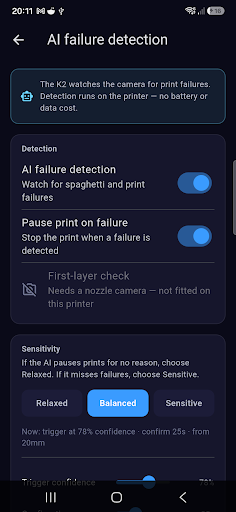
- Bed mesh view and Creality AI failure detection controls
- Cancel individual objects mid print
- Config file editor with automatic backups
- G code and Klipper console
- Push notifications when a print finishes or an error is detected
- Works on your local network, or securely from anywhere with remote access
NO CREALITY CLOUD ACCOUNT REQUIRED
Connects directly to your printer over your own network. Remote access uses a
private, self hosted relay, not Creality Cloud. Your printer stays yours.
WORKS WITH
Creality K2, K2 Plus and K2 Pro. Built on Klipper and Moonraker.
One time purchase. No subscription. Optional one time unlock for managing
multiple printers.
MONITOR
• Live print status: progress, layer, time remaining and a thumbnail of what's printing
• Real-time nozzle, bed and chamber temperatures
• Built-in camera view so you can watch the print
CONTROL
• Pause, resume, cancel and emergency stop
• Fans, lights, print speed and flow, Z-offset baby-stepping, homing, filament load/unload
• CFS multi-material box: live temperature, humidity and per-slot colours
• Upload G-code and start a print straight from your phone
RICHER KLIPPER TOOLS
• Bed-mesh heatmap — see your bed levelling at a glance
• Browse, reprint and manage the files already on your printer
• One-tap Klipper restart and recovery
REMOTE ACCESS, FROM ANYWHERE
• Securely reach your printer when you're away from home — no router setup, no port forwarding
• Per-device security, encrypted in transit
• Your data stays yours: there's no account, and we don't store your printer data
PRIVATE BY DESIGN
K2 Companion is local-first. On your home network it talks directly to your printer, stores everything on your device, and uses no advertising or tracking. Optional remote access routes through a secure relay that forwards your data without keeping it.
Pay once. Own it. No monthly fees, ever.
Requires a Creality K2 (or K2-family) 3D printer on your network.
Hark Tech — Professional Electronics Repair & 3D Printing. Basingstoke, UK.
Capturas
Galería de la tienda · 8
🇸🇮
#185
Slovenia · grossing
Overall (all apps)
Presencia en tiendas
A fecha de 17 jul 2026desactualizado (62 d)
Valoración—
Valoraciones—
Precio—
Versión1.6.1
Actualizada8 jul 2026
Lanzada3 jul 2026
Instalaciones50–68
Compras integradas€6.99 if billed through Play
Matriz de rankings
Ranking actual por país × género, mostrado con bandas de color
1–3 4–10 11–50 51–100 100+
🇸🇮SI
Overall (all apps)
185
Evolución del ranking
Elige ranking, género y mercados
Historial de versiones
Versiones observadas, de más nueva a más antigua
v1.6.18 jul 2026
New in-app Help with setup guides, including how to set up Spoolman.<br>Spoolman: the app now leaves usage tracking to your printer if its Moonraker already updates Spoolman, so nothing is counted twice. Spool locations are shown when picking a spool, handy across multiple printers.<br>Plus small fixes.
Impacto de actualizaciones
Lanzamientos fechados · ranking y reseñas 14 días antes → después
Evolución del sentimiento
Proporción positiva, neutral y negativa por mes, semana o versión
Reseñas de jugadores
Reseñas recientes · etiquetas basadas en reglas
Aún no hay cobertura de reseñas para esta aplicación.