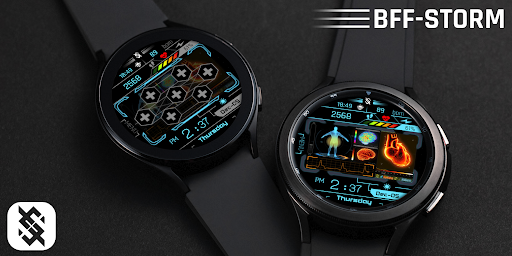
Animation Technology for Wear OS by BFF-Storm (Except for the square watch face)
NOTE : You need to make sure the Google Play account on your phone and watch is the same. To avoid the situation: "Your devices are not compatible".
NOTE: The Watch faces sold by BFF-Storm on the Play Store are currently in the process of feature completion based on Samsung's new Wear Os Google / One UI operating system. So we are committed to update the watch face as soon as possible if a new function is completed. And when you have problems using it, you can contact us via gmail:
[email protected]
We will support and answer questions 24/7.
NOTE: Make sure you have enabled all permissions from settings -> Applications.
NOTE: How to install watch face?
1 - Make sure the watch is connected to the electricity via bluetooth, open the watch face app page to install.
Open the "Install on more device" option (Triangle icon to the right of the free install or purchase button).
Turn off the settings on the phone just to set it on the watch. And do the installation.
After successful installation, a notification will be displayed on the watch, you can search the application on the watch.
If the app doesn't appear on the watch, open the Galaxy Wearable app on your phone, select watch faces and scroll down to the downloaded apps section and select watch faces to have them show up on the watch.
2 - If you have installed companion apps on your phone by mistake, you can delete them once the watch face has been installed.
3 - If you have sync problems between your phone, Play Store and watch, install watch face directly from your watch, or you can try from your PC web browser or visit our website to Search product.
This watch face supports all Wear OS devices with API Level 30+.
NOTE: Customizable fields:
You can customize them in the custom watch face section such as: weather, sunset/sunrise, appointment,.....and much more.
NOTE : Customize button:
-Tap to select app shortcut
-Tap to open the app shortcut
NOTE : You can tap the menu to open it. And tap again if you want to back. The menu will assist you to use the shortcuts we have installed. (You can see the instructions in the picture section)
NOTE : Some features may not be available on some watches. This watch face will not apply to square face watches.
The BFF3 - Technology Health HUD by BFF-Storm.
Watch Face Features: (You can see them on the picture description)
- 12/24Hr based on phone settings
- Time information: Day, Month.
- Health information: Step counts, Heart rate.
- Battery
Other customized information
- Optional Border *8
- Optional Stop Animation
- Optional color *16
Always on display supports:
- The AOD screen will be fully displayed as the normal screen you have installed.
App shortcuts :
-7 customize app shortcuts. (You can see in the image description for where the 7 buttons are.)
You can see more details on our image description.
Customize :
1 - Touch and hold the screen
2 - Tap on customize option
Video tutorial and description of watch face:
https://www.youtube.com/watch?v=koiiZEM0r90
Please visit us at:
Facebook: https://www.facebook.com/BFFKINGSTORM
Instagram: https://www.instagram.com/bffstormer/
Webpage: https://bffstormwatchface.com/
Thank You !!
Screenshots
Store gallery · 22
🇱🇻
#157
Latvia · grossing
Overall (all apps)
🇺🇸
#172
United States · paid
Overall (all apps)
🇬🇧
#200
United Kingdom · paid
Overall (all apps)
Store presence
As of Jul 17, 2026stale (62d)
Rating3.00
Ratings6
Price—
VersionVARY
UpdatedApr 4, 2026
ReleasedDec 25, 2022
Installs1,000–1,533
In-app purchasesNo
Rating breakdown
Store rating histogram · 6 ratings
5★3 (50%)
4★0 (0%)
3★0 (0%)
2★0 (0%)
1★3 (50%)
Rank grid
Current rank by country × genre, shown as color bands
1–3 4–10 11–50 51–100 100+
🇱🇻LV
Overall (all apps)
157
Rank over time
Choose chart, genre, and markets to compare
Version history
Versions observed at capture, newest first
vVARYApr 4, 2026
BFF3 - Technology Health HUD
Update impact
Dated releases · rank and review signals, 14 days before → after
Review sentiment over time
Positive, neutral, and negative share by month, week, or version
Player reviews
Recent store reviews · rule-based labels
Review coverage is not available yet for this app.